One Stage Sets the Pace: Planning Megatron Pipeline Layouts for MoE Models with MTP
When you train a model with pipeline parallelism, its layers are split across GPUs and
every training step waits for the slowest one. Megatron-LM lets you choose the split
with a single flag, --pipeline-model-parallel-layout, but you write that string by hand.
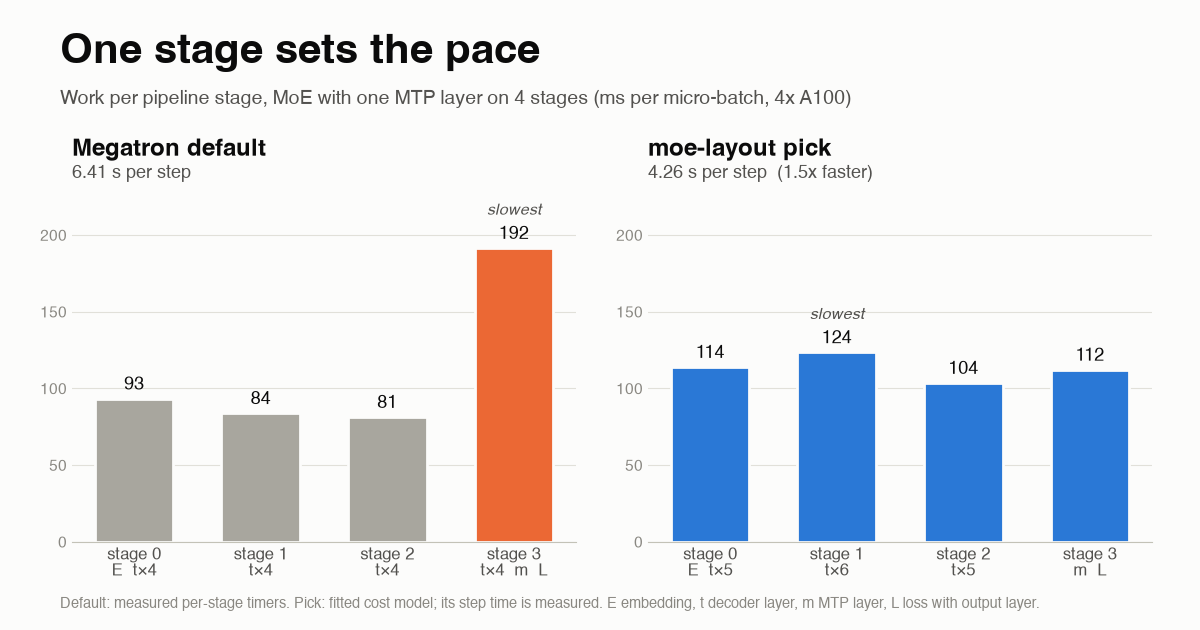
For Mixture-of-Experts models with multi-token prediction (MTP), the default split is badly uneven. The last stage gets its share of decoder layers, plus the output layer, plus the MTP layer. On a 4-stage pipeline I measured it doing 2.3x the work of the other stages. The other three GPUs spend most of every step waiting.
So I wanted to know: can two short profiling runs replace the trial and error of writing that string by hand?
That became moe-layout. It measures what each part of the model really costs, simulates Megatron’s pipeline schedule for every split Megatron accepts, and prints the fastest layout that fits in memory. On 8x H200, at the scale of the reference recipe in Hugging Face’s MoE Training Handbook, its pick ran 1.39x faster than Megatron’s default split and 1.12x faster than the count-based auto layout. It predicted the step time within 2.7 percent. The whole study cost about $16 of GPU time.
One thing up front: this is one node, one model shape and short runs. The numbers are real, but they come from a small study, and I list what it doesn’t cover at the end.
Why the last stage gets so heavy
Pipeline parallelism cuts the model into consecutive stages, one per GPU or group of GPUs. A batch is split into micro-batches that move through the stages like an assembly line, under a schedule called 1F1B (one forward, one backward). When the stages are equal, everyone stays busy. When one stage does twice the work, the whole line runs at its speed.
The layout flag describes which layers each stage holds:
| Symbol | Meaning |
|---|---|
E |
embedding |
t |
transformer decoder layer |
m |
MTP layer |
L |
loss, including the output layer that turns hidden states into logits |
Stages are separated by a vertical bar, and t*4 means four decoder layers. Megatron’s
docs
give DeepSeek-V3’s layout as an example: Et*3|(tt|)*29,m|L. That’s the kind of string
people tune today, usually with A/B runs on the full cluster.
Two things make the last stage heavy:
- The output layer is big. It multiplies every token by a
hidden x vocabularymatrix. In the handbook recipe that is 2048 x 128,256, which costs several decoder layers’ worth of work. - MTP adds more. Multi-token prediction, which DeepSeek-V3 made popular, trains the model to predict tokens further ahead. Each MTP module brings its own transformer block and another pass through the output layer. Without a custom layout, Megatron puts every MTP layer on the last stage.
The handbook saw early training steps about 37 percent slower with one MTP layer at 256 nodes. The Ling 2.0 report (arXiv 2510.22115) got a 40 percent end-to-end gain by refining its split by hand. The problem is known. What’s missing is a tool.
How moe-layout works
- Size the model. It counts parameters, FLOPs and memory per unit (
E,t,m,L) from a config or a Megatron command line. As a sanity check, it reproduces the handbook’s 6.86B total and 1.22B active parameters exactly. - Profile twice. It runs two short layouts, 20 iterations each, with Megatron’s
per-GPU timers on (
--timing-log-level 2 --timing-log-option all). The two layouts are chosen so every unit’s cost can be separated from the others. - Fit. It solves for each unit’s forward and backward time per micro-batch from the per-stage timings.
- Search. It enumerates every split Megatron’s validator accepts (816 of them for 16 layers, 1 MTP layer and 4 stages) and simulates the 1F1B schedule for each. It drops the layouts that don’t fit in GPU memory.
- Emit. It prints the best layout strings with predicted step time and memory per stage, next to Megatron’s default and the count-based rule.
The step that matters most is the second one: profile, don’t guess. My first version estimated costs from FLOPs, and the estimates got the direction right and the size wrong.
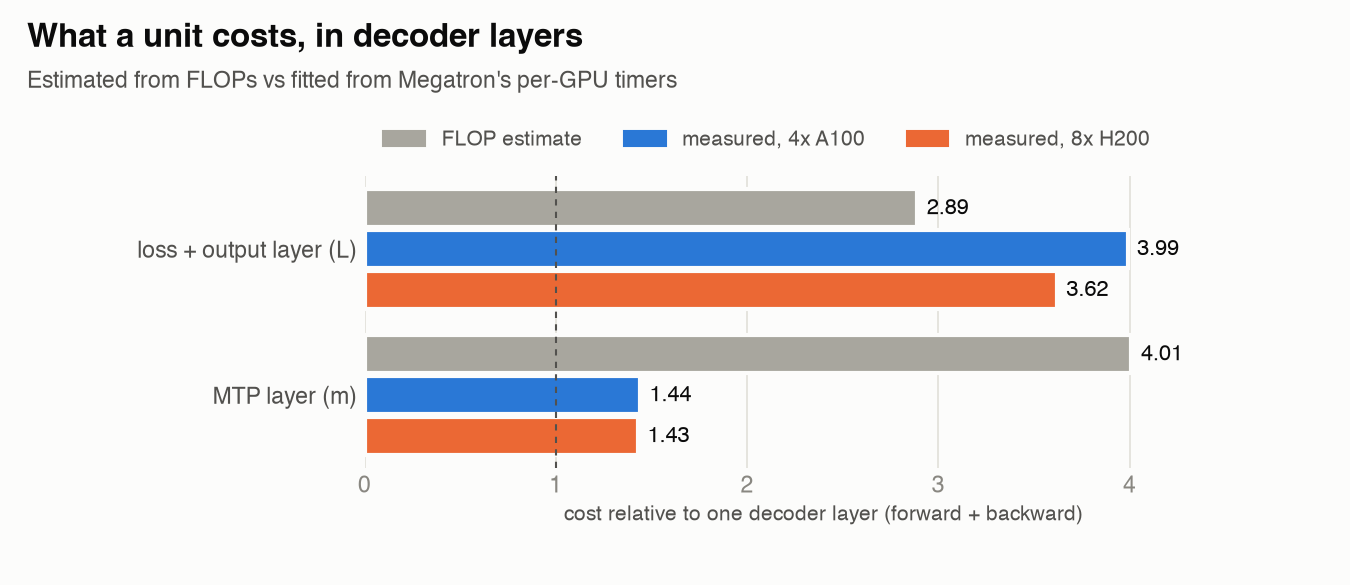
From FLOPs, the MTP layer looks like four decoder layers. Measured, it’s about 1.4, on both A100 and H200. The output layer goes the other way: FLOPs say 2.9, the timers say 3.6 to 4.0. A planner working from FLOPs alone would have picked a layout that measured 10 percent slower than the profiled pick. The good news is that the measured ratios barely moved between two GPU generations.
Results
I ran three stages on Hugging Face Jobs, on the stock NGC PyTorch container with Megatron pinned to the handbook’s commit:
- Stage A, profile (4x A100). A 4-GPU proxy of the handbook recipe: same layers, 32 experts instead of 64 so each stage fits without expert parallelism, and one MTP layer. I profiled two layouts and measured the two baselines.
- Stage B, measure (4x A100). I measured the planner’s top picks, a few neighbours, and a repeat of the default to check the noise between runs.
- Stage C, handbook scale (8x H200). 64 experts, expert parallelism 2. A single job profiled, planned on its own fit, measured the pick, and then measured both baselines on the same node.
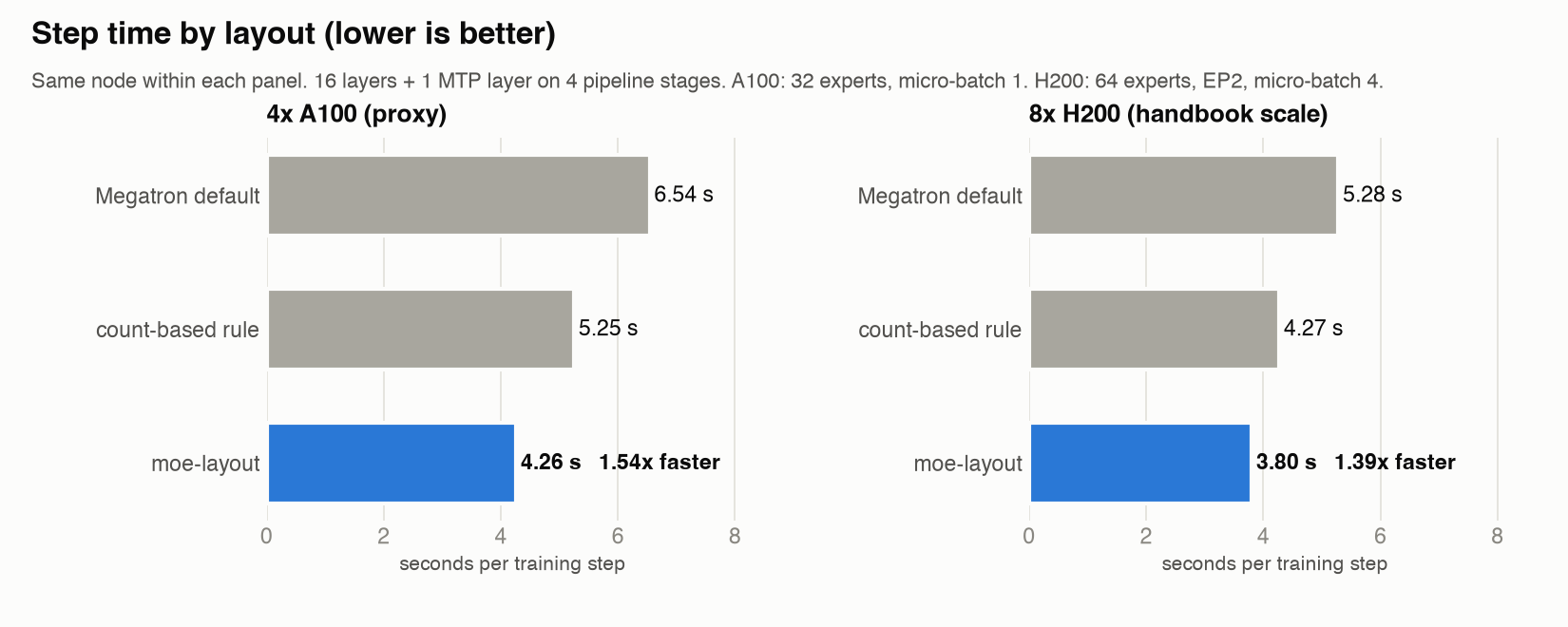
On both machines the planner picked Et*5|t*6|t*5|mL: five decoder layers with the
embedding, then six, then five, and a last stage holding only the MTP layer and the loss.
| 4x A100 (proxy) | 8x H200 (handbook scale) | |
|---|---|---|
| vs Megatron default | 1.54x faster | 1.39x faster |
| vs count-based rule | 1.26x faster | 1.12x faster |
| Prediction error, planner’s pick | 2.7% | 2.7% |
| Gap to the best layout measured | 0.5% (best of 6) | fastest of 3 |
| GPU cost | about $6 | about $10 |
The “count-based rule” is the split from Megatron Lite’s auto layout. It treats the embedding, the MTP layer and the loss as one layer each, which is better than the default but still too heavy at the end.
It chose that layout independently on both GPU types, each time from its own profiling runs.
Where it misses
The model is good at single-bottleneck layouts that keep MTP and the loss together. Those predictions were within 4 percent on A100 and 2.7 percent on H200. Two cases on A100 it got wrong:
- MTP on its own stage ran 12 percent slower than predicted. Megatron can put the MTP layer on a different stage from the loss. The compute on that stage matched the fit, so the extra time comes from somewhere else, probably communication or synchronization that only this mode adds. I haven’t diagnosed it. The planner now flags these layouts and leaves them out by default.
- Two equally slow stages ran 6 percent slower than predicted. The simulator assumes each stage takes the same time on every micro-batch. Real stages jitter, and two critical stages compound the waiting. The planner now reports how many stages sit near the bottleneck and prefers a single one when predictions tie.
The memory estimate is calibrated against Megatron’s “max allocated” on 40 measured stages, with a 2.8 percent mean error. At micro-batch 4 it overestimates the last stage (52 GB predicted, 38 GB measured), which errs on the safe side.
What it doesn’t cover
- One node, short runs, one seed. That’s 15 to 20 iterations per layout, early in training. Routing behaves differently later in training.
- One model shape. The handbook recipe has a small hidden size (2048), so its output layer is heavy relative to a decoder layer. At DeepSeek-V3’s width the gain should be smaller, though the method is the same.
- No interleaved schedules. Layouts with more than one virtual stage per GPU are validated but not simulated yet.
- A smaller batch on H200. Global batch 128 instead of the handbook’s 512, to stay within budget.
The full write-up is in the repo’s technical report, with every number, the exact commands and the cost of each run.
Try it
The planner is plain Python with no dependencies:
pip install git+https://github.com/antonellof/moe-layout
python -m moe_layout size configs/handbook_7b_a1b.json
python -m moe_layout profile-layouts CONFIG --pp 4
python -m moe_layout fit CONFIG --run "LAYOUT1=run1/train.log" --run "LAYOUT2=run2/train.log" -o costs.json
python -m moe_layout plan CONFIG --pp 4 --costs costs.json --hbm-gb 76
To run the whole closed loop on Hugging Face Jobs (profile, plan, measure the pick and the baselines), the repo has a runner. Stage C took one command and about $10.
What’s next
- Simulate interleaved schedules, since that’s how large MoE models are actually trained.
- Find out where standalone MTP loses its 12 percent.
- Try a DeepSeek-V3-shaped model (61 layers) across more than one node.
- Offer the planner upstream, as a helper in Megatron-LM or Megatron-Bridge.
If you train MoE models with pipeline parallelism and MTP, I’d like to hear whether the picks hold on your setup. The two profiling runs plus one measured layout are cheap, and a GitHub issue with the three step times and your config would help the most.