The Local Agent Trio: cmux + Pi + Unsloth Studio
Cloud agents are convenient right up until you care about privacy, predictable costs, or a model that will not rate-limit you at 2am in the middle of a refactor. And here is the thing nobody tells you: the hard part of going local is not finding a model. It is wiring the terminal, the inference server, and the agent harness into something you can actually sit in front of for eight hours without wanting to throw the laptop out the window.
After a fair amount of trial and error, this is the trio I keep coming back to:
- cmux — native macOS terminal (Ghostty-based) built for juggling multiple AI agents in parallel
- Unsloth Studio — local web UI + OpenAI/Anthropic-compatible API over
llama.cpp - Pi — minimal open-source coding agent in the terminal
Point Pi at Unsloth. Run Unsloth in one cmux pane. Run Pi in another. When GLM-5.2 fits your hardware, you get frontier-class open weights at home. When it does not — and it often does not — the same stack still works with smaller GGUFs while you plan your RAM upgrade.
Why three tools instead of one?
Monolithic “local AI” apps try to be terminal + model server + agent + UI. They work until you want to swap the agent, swap the model, or run two agents side by side without two Electron apps eating 4GB each.
| Layer | Tool | Job |
|---|---|---|
| Terminal / workspace | cmux | Panes, tabs, agent notifications, git context in sidebar |
| Inference | Unsloth Studio | Download GGUFs, chat UI, /v1/chat/completions API |
| Agent harness | Pi | read / write / edit / bash loop against your repo |
Each piece is replaceable. Swap Pi for Claude Code pointed at the same Unsloth endpoint. Swap Unsloth for raw llama-server. Keep cmux either way — that is the whole point.
Layer 1: cmux — the agent-aware terminal
cmux is an open-source (GPL-3.0), native macOS terminal from Manaflow (a YC S24 company). It is not a fork of Ghostty — it embeds libghostty as a rendering library inside a Swift/AppKit app, the same way other apps embed WebKit, and even reads your existing ~/.config/ghostty/config. It was built for one specific itch: running a pile of coding agents in parallel without losing track of which one is blocked on you. The author got tired of staring at a wall of Ghostty splits where every Claude Code notification just said “Claude is waiting for your input” with no idea which Claude. That frustration is the whole product, and it shows.
What matters for agent work:
- Vertical tab sidebar — git branch, working directory, ports, latest notification text per workspace
- Notification rings — blue halo on panes when an agent needs input (OSC 9/99/777 or
cmux notify) - Cmd+Shift+U — jump to the most recent unread notification
- Split panes — shell + Pi + browser without nested tmux config archaeology
cmux docs list Pi alongside Claude Code, Codex, OpenCode, and Gemini CLI as agents that work out of the box — because cmux is a terminal, not a vendor lock-in product. Notification hooks wire into agent lifecycle with:
cmux notify --title "Pi" --body "Waiting for your input"
Compared to tmux: tmux multiplexes inside a terminal; cmux is the terminal with GUI affordances agents actually need. Compared to Warp: cmux is native Swift, not Electron, and does not force one agent workflow.
Install from cmux.com or build from github.com/manaflow-ai/cmux.
Layer 2: Unsloth Studio — inference without the YAML archaeology
Unsloth Studio is an open-source, browser-based local GUI for running (and training) open models. Under the hood: llama.cpp, with extras — self-healing tool calling, code execution, web search, automatic inference tuning, Hugging Face Hub search built in.
Install:
curl -fsSL https://unsloth.ai/install.sh | sh
unsloth studio -p 8888
Open http://127.0.0.1:8888, set a password on first run, then head to Chat → Select model. Studio exposes:
GET /api/health— health checkPOST /v1/chat/completions— OpenAI-compatible (Pi, Cursor, Continue, Cline…)POST /v1/messages— Anthropic-compatible (Claude Code, OpenClaw…)GET /v1/models— whatever is loaded in memory
API key lives under Settings → API (printed once at startup as sk-unsloth-...). Full reference: Unsloth API docs.
GLM-5.2 on the model picker — and the OOM badge
GLM-5.2 is Z.ai’s open Mixture-of-Experts model. The official model card lists it at 753B parameters with a 1M-token context under an MIT license (Unsloth’s docs round it to ~744B; the Studio picker in my screenshot reads 753.9B). Being an MoE, only a slice of those weights fire per token — but you still have to hold the entire thing in memory. Unsloth’s UD-IQ2_M 2-bit quant needs roughly 240–245 GB of RAM or unified memory — realistic on a 256 GB Mac Studio, not on a laptop without serious SSD offloading.
Here is what my Studio instance looked like on launch day:
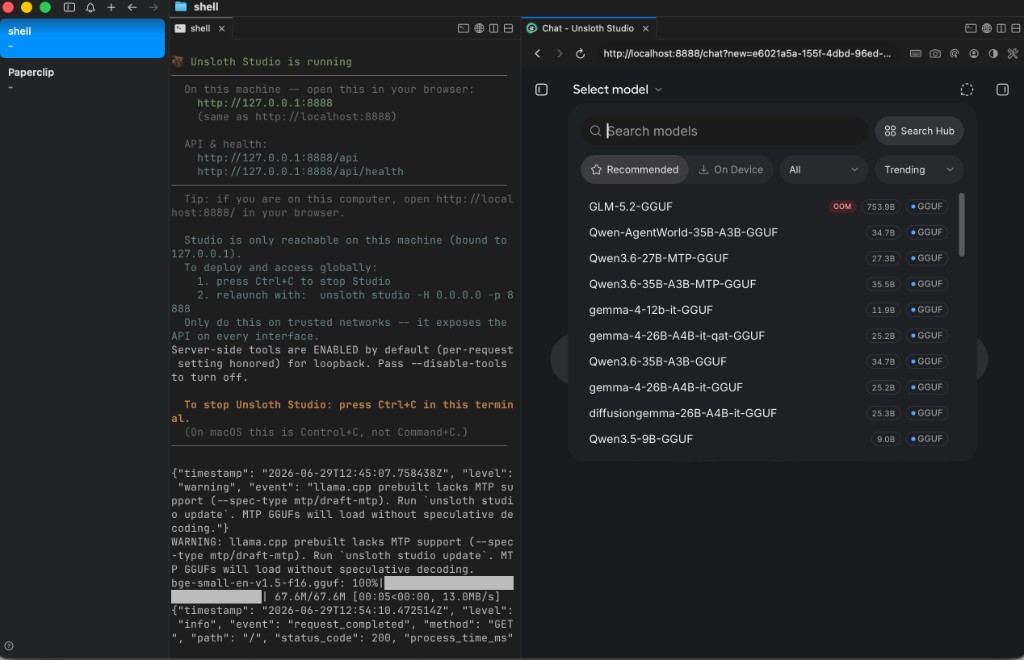
GLM-5.2-GGUF at 753.9B with a red OOM pill is Studio being honest: your machine cannot load that variant right now. The trio setup still works — load Qwen3.5-9B-GGUF, gemma-4-12b, or another On Device model from the same picker while you plan for GLM-scale RAM.
When hardware cooperates, search GLM-5.2 in Studio, pick UD-IQ2_M (or higher quant if you have headroom), download the shards from unsloth/GLM-5.2-GGUF, and chat with High/Max thinking toggles in the UI. CLI alternative:
hf download unsloth/GLM-5.2-GGUF \
  --local-dir unsloth/GLM-5.2-GGUF \
  --include "*UD-IQ2_M*"
Terminal logs worth knowing:
- Studio binds to
127.0.0.1:8888by default; use-H 0.0.0.0for LAN access (Pi on another machine, phone on same network) llama.cpp prebuilt lacks MTP support— rununsloth studio updateif you want speculative decoding on MTP-tagged GGUFs; models still load without it
Layer 3: Pi — the minimal coding harness
Pi (package @earendil-works/pi-coding-agent) is a minimal terminal coding agent by Mario Zechner — yes, the libGDX guy. It ships with exactly four tools (read, write, edit, bash), the shortest system prompt of any serious agent, multi-provider LLM support, and no baked-in sub-agent circus. The philosophy is “adapt the harness to your workflow, not the other way around” — anything the bigger agents bundle, you add yourself as a TypeScript extension or a Pi package. It is MIT, now stewarded by Earendil, and it is the agent core underneath OpenClaw, so it is battle-tested despite the minimalism.
Install:
npm install -g --ignore-scripts @earendil-works/pi-coding-agent
pi
Pi supports Anthropic, OpenAI, OpenRouter, Ollama, and any OpenAI-compatible local server via ~/.pi/agent/models.json. Docs: pi models.md.
For llama.cpp servers specifically, Hugging Face ships pi-llama — auto-discovers models from a running server:
pi install git:github.com/huggingface/pi-llama
# LLAMA_BASE_URL defaults to http://localhost:8080/v1
Unsloth wraps llama.cpp on port 8888 with its own API surface — so the direct path is OpenAI-compat config:
{
  "providers": {
    "unsloth": {
      "baseUrl": "http://127.0.0.1:8888/v1",
      "api": "openai-completions",
      "apiKey": "sk-unsloth-your-key-from-settings",
      "models": [
        {
          "id": "unsloth/GLM-5.2-GGUF",
          "name": "GLM-5.2 local (Unsloth)",
          "contextWindow": 131072
        }
      ]
    }
  }
}
Use the exact model id from curl http://127.0.0.1:8888/v1/models after loading in Studio. Then inside Pi:
/model
Select your Unsloth provider model. Pi’s status bar shows provider, model, token budget, and cost (zero for local).
Pi inside cmux
My cmux sidebar with shell, π, and Paperclip tabs:
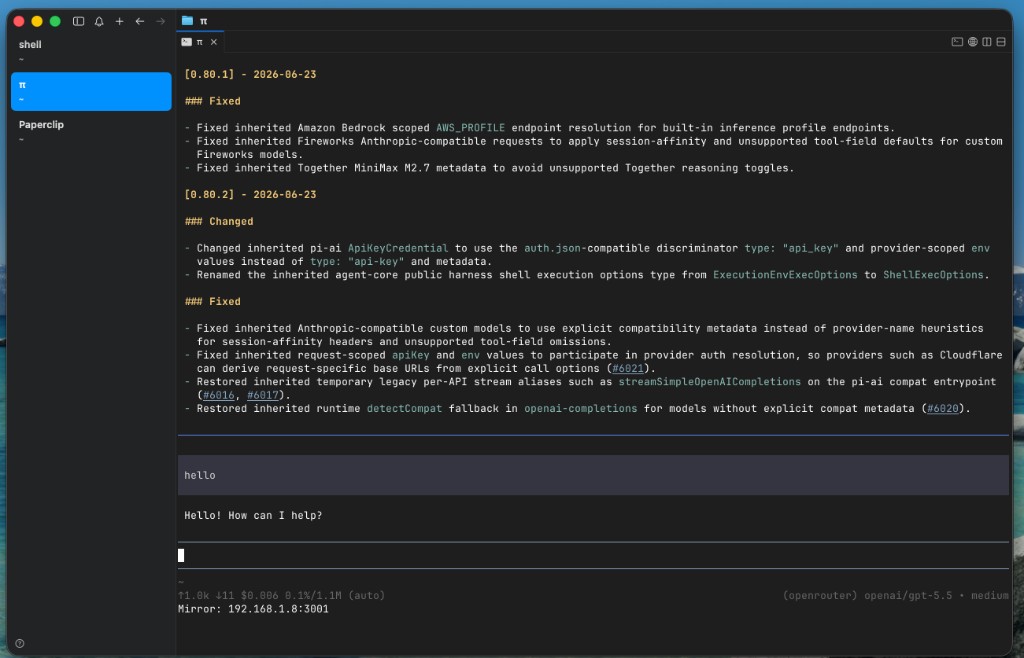
The screenshot shows Pi on OpenRouter / GPT-5.5 — useful when GLM-5.2 OOMs or you need a quick cloud fallback. Same pane, swap model via /model to your Unsloth local entry when the GGUF is loaded. That is the trio’s flexibility: one terminal layout, two inference backends.
Pi v0.80.x changelog visible in the pane (June 2026) — active project, weekly releases, pi-ai provider auth improvements. Mirror line 192.168.1.8:3001 in the status bar is Pi’s optional session mirror for secondary clients — handy if you want phone/tablet observation without disturbing the agent pane.
Wiring the trio: step by step
Pane A — Unsloth (inference server)
unsloth studio -p 8888
# Load a model in the browser (Chat → Select model)
# Copy API key from Settings → API
Pane B — Pi (coding agent)
export PI_MODEL=unsloth/your-loaded-model-id   # optional shortcut
pi
/model   # pick Unsloth provider
cmux layout
- Tab 1
shell: Studio server logs,curlhealth checks,hf downloadprogress - Tab 2
π: Pi session on your repo (cd ~/Projects/my-app && pi) - Optional Tab 3
Paperclip: docs, PRDs, attachments Pi reads viaread
When Pi blocks on a tool approval or finishes a long task, wire a hook:
cmux notify --title "Pi" --subtitle "my-app" --body "Ready for review"
GLM-5.2: when the trio earns its name
GLM-5.2 is why you bother with Unsloth at all instead of pulling a 7B model from Ollama and calling it a day. The MoE design means the model carries frontier-scale knowledge while only activating a fraction of its parameters per token — you get agentic coding, long-horizon reasoning, and a 1M-token context out of weights that, quantized, fit in a (very large) workstation. Unsloth’s Dynamic GGUF quants are the part doing the heavy lifting: they compress aggressively while trying hard to preserve accuracy.
Realistic hardware map (from Unsloth docs):
| Quant | Approx. RAM | Notes |
|---|---|---|
| UD-IQ1_S | ~223 GB | Most aggressive |
| UD-IQ2_M | ~245 GB | Recommended balance |
| UD-Q8_K_XL | ~810 GB | Near full precision |
No 256 GB Mac? Run the trio with Qwen3.5-9B, gemma-4-12b, or Qwen3.6-27B locally — same cmux layout, same Pi config, same API wiring — and treat GLM-5.2 as the target state when RAM catches up. The OOM badge in Studio is a feature, not a failure.
Troubleshooting the obvious failures
Pi cannot see tools / agent stalls after first bash
OpenAI-compat shims sometimes drop streamed tool_calls. Pi’s models.json compat flags help; for Ollama specifically use pi-ollama native provider. Unsloth’s self-healing tool calling is designed for this — if issues persist, check Studio logs while Pi runs.
Studio port conflict
Default is 8888; docs also mention 8000 depending on version. Terminal prints the actual URL on boot — use that in baseUrl.
GLM download is 6 shard files, hundreds of GB
Plan disk and time. hf download with --include "*UD-IQ2_M*" pulls only the 2-bit shards. Resume supported.
MTP warning in shell
Update Studio: unsloth studio update. MTP speculative decoding is optional; chat works without it.
Want Claude Code instead of Pi
Same Unsloth server, Anthropic route:
export ANTHROPIC_BASE_URL="http://127.0.0.1:8888"
export ANTHROPIC_API_KEY="sk-unsloth-your-key"
export ANTHROPIC_MODEL="unsloth/gemma-4-26B-A4B-it-GGUF"
claude --model "$ANTHROPIC_MODEL"
See Unsloth’s Claude Code guide. cmux does not care which agent occupies the pane.
Bottom line
The trio is not “install one app and pray.” It is a deliberate split:
- cmux — see every agent, know which one needs you
- Unsloth — search, download, serve, and API-wrap open models including GLM-5.2
- Pi — minimal harness that respects your repo and your keys
GLM-5.2 on Unsloth is the headline. The OOM badge in my screenshot is the honest footnote: frontier-class local AI genuinely exists now, but RAM is still the gate, and most of us are not sitting on 256 GB of unified memory yet. That is fine. The setup earns its keep today with a model that fits, and the day you do upgrade, the path is “pick a bigger GGUF in the same picker” — not “rewrite your whole workflow.”
So: start cmux, start Studio, load whatever your machine can hold, and point Pi at localhost:8888/v1. Then go refactor something you would rather not have shipped off to a cloud provider in the first place.
cmux: cmux.com · github.com/manaflow-ai/cmux. Pi: pi.dev · github.com/earendil-works/pi. Unsloth Studio: unsloth.ai/docs/new/studio. GLM-5.2: unsloth.ai/docs/models/glm-5.2.