gitgui: a real git GUI inside cmux, next to Pi
I wrote The Local Agent Trio: cmux + Pi + Unsloth Studio about splitting your local stack into cmux, inference, and Pi. Git stayed in the shell.
Pi runs git status and git diff fine. You still lose the commit graph, the staged file list, inline diffs, and hunk buttons when you review a refactor. I kept Alt-Tabbing to Fork or squinting at git diff output. I wanted Sourcetree in the same cmux grid as the agent.
So I built gitgui, one Rust binary that paints a GUI into your terminal pane with the kitty graphics protocol. Pixels, not a TUI. Graph, sidebar, diff viewer, commit box, editor, conflict resolver. cmux, Ghostty, kitty, WezTerm. Over SSH it sends zlib plus base64 frames.
Updated 2026-09-07 for v0.6.0: the UI moved from egui to iced, the panes drag, resize and hide, merge conflicts get a three-way resolver, the layout is remembered per repository, and the same binary opens a desktop window in terminals without kitty graphics. Plus a folder switcher, zoom keys and SHA-256 repositories.
This is my daily layout: the agent on the left, gitgui v0.6.0 on the right, same cmux workspace, same checkout.
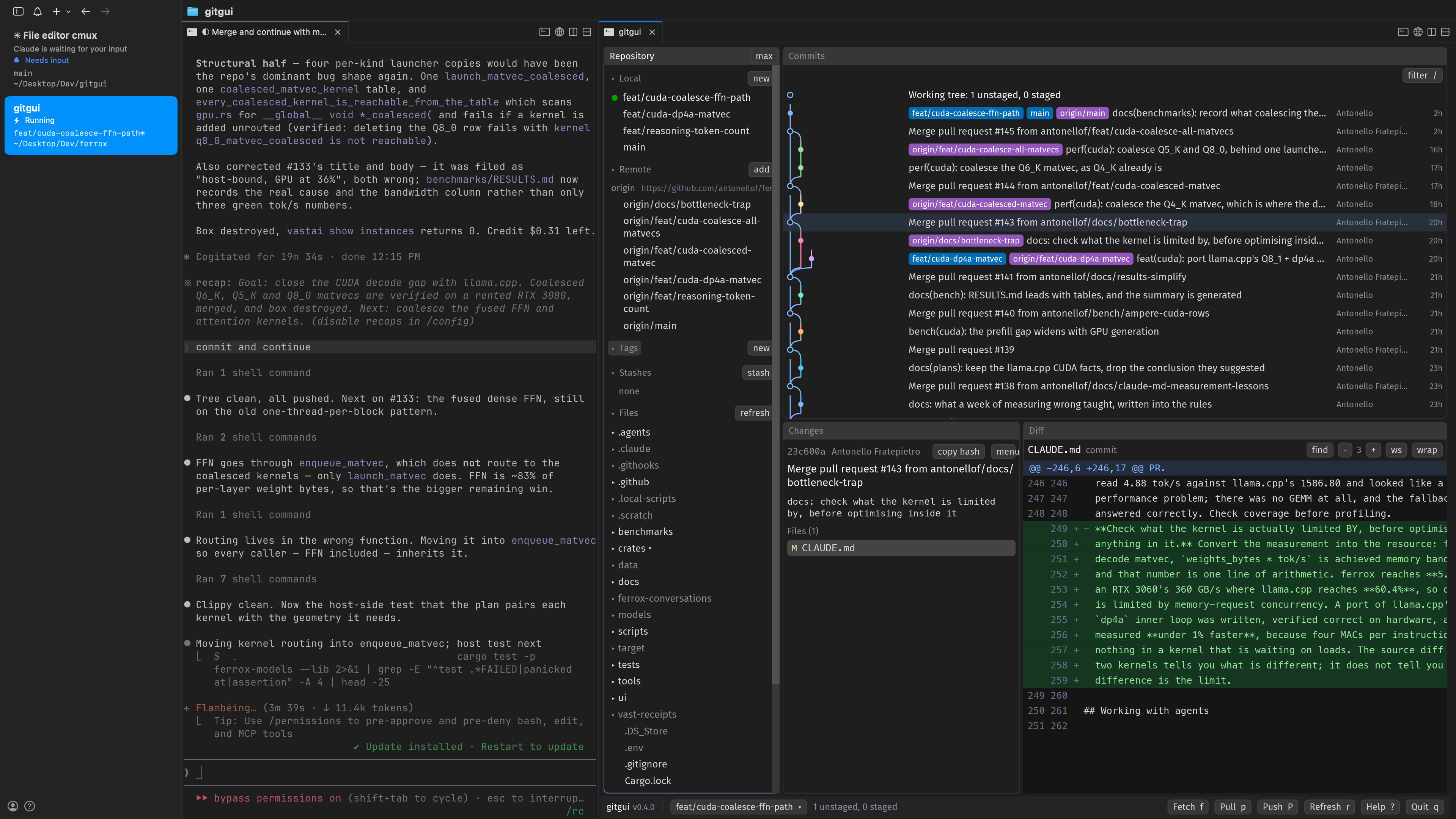
The agent edits the repo. gitgui shows branch lanes, unstaged files, and hunk buttons. One workspace. One checkout. cmux + agent + gitgui = 😍
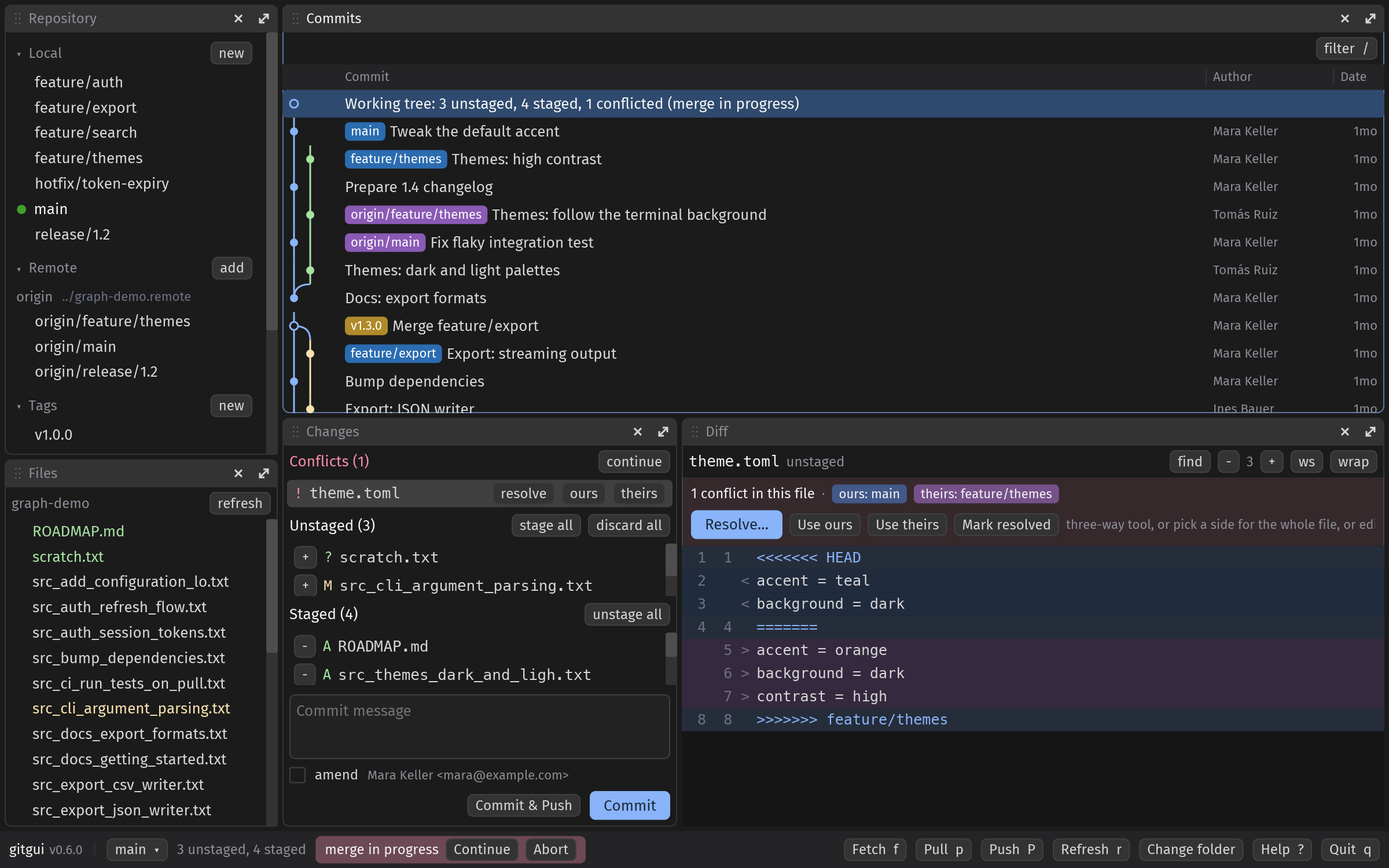
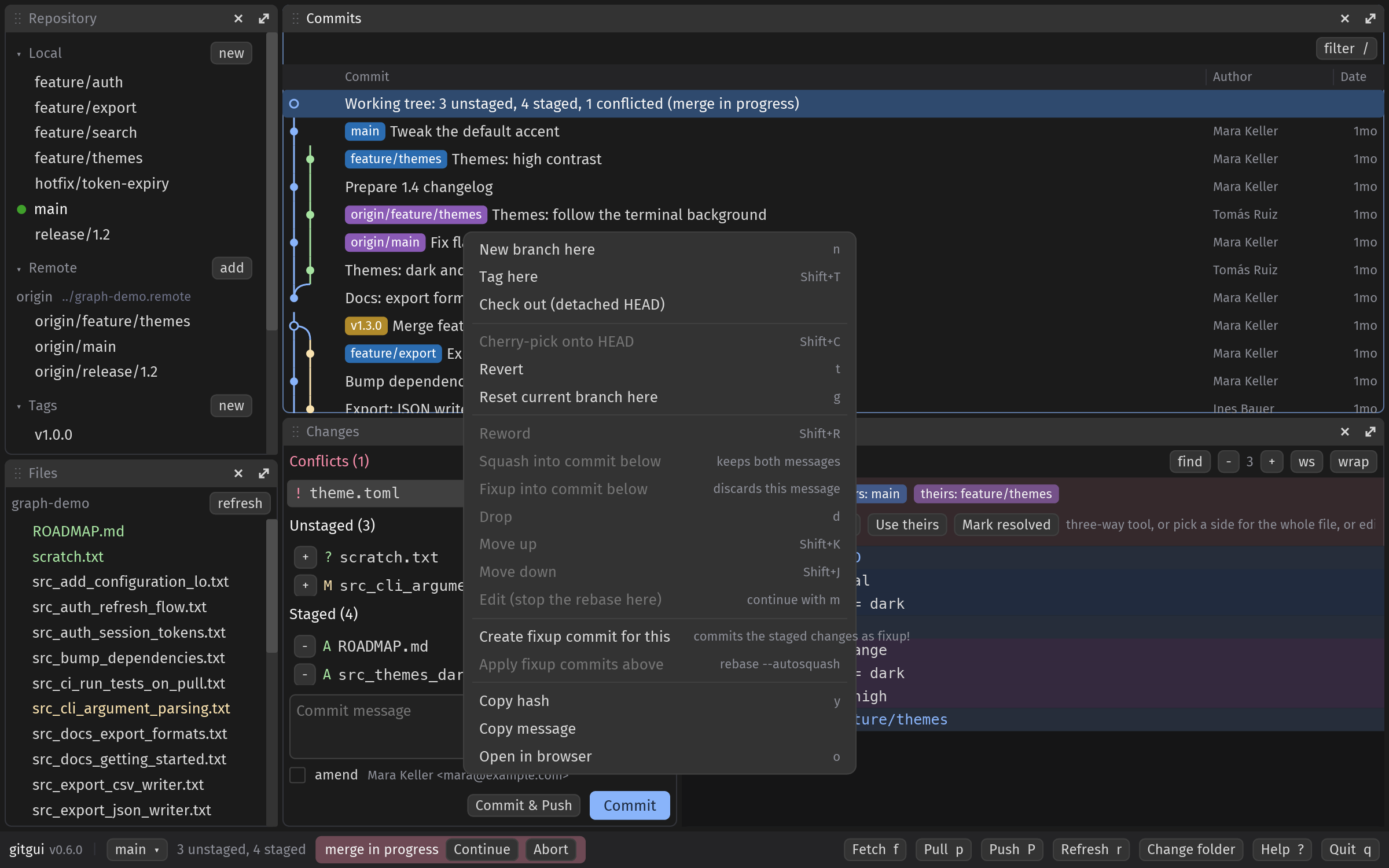
On a repo with branches, tags, a stash and a merge stopped on a conflict it looks like this:
Why stay inside the terminal?
cmux is a pane grid. You already split shell, Pi, and sometimes a browser. Fork or GitKraken pull you out: different font, different shortcuts, another app fighting for focus.
lazygit and gitui help for quick commits. They fall short when you read a three-file refactor with colored hunks, click Stage hunk on one block, and scan merge lanes on a graph. I wanted mouse clicks and a graph without leaving the grid.
terminal-browser and terminal-code proved the pattern: render pixels in the terminal, read pixel mouse events back. gitgui uses iced instead of Chromium, driven without a window.
Three steps:
- Build the iced UI, draw it with the tiny-skia software renderer straight into an RGBA framebuffer
- Send the framebuffer as a kitty graphics image each frame
- Map kitty keyboard and SGR mouse events into iced events
Your terminal never prints UI text. It shows a picture. Locally frames go through POSIX shared memory. On my Mac a 1600×1000 frame at 2x costs about 6 ms.
What you get in v0.6.0
- Panes you arrange: repository, files, commits, changes and diff on an iced pane grid. Drag a title bar to move a pane, drag the gaps to resize, maximize with the arrows or
1to5, hide a pane with its x and bring it back from the footer. The commit list’s columns resize from the header. The layout, hidden panes, collapsed sections and zoom are saved per repository in.git/gitgui.jsonand come back on the next start. - Commit graph with branch lanes, ref pills, filter by summary, author or hash.
- Staging by file, hunk or line: click, Shift+click or drag lines in the diff, then Stage or Discard just those. Search in the diff, adjust context, ignore whitespace, wrap.
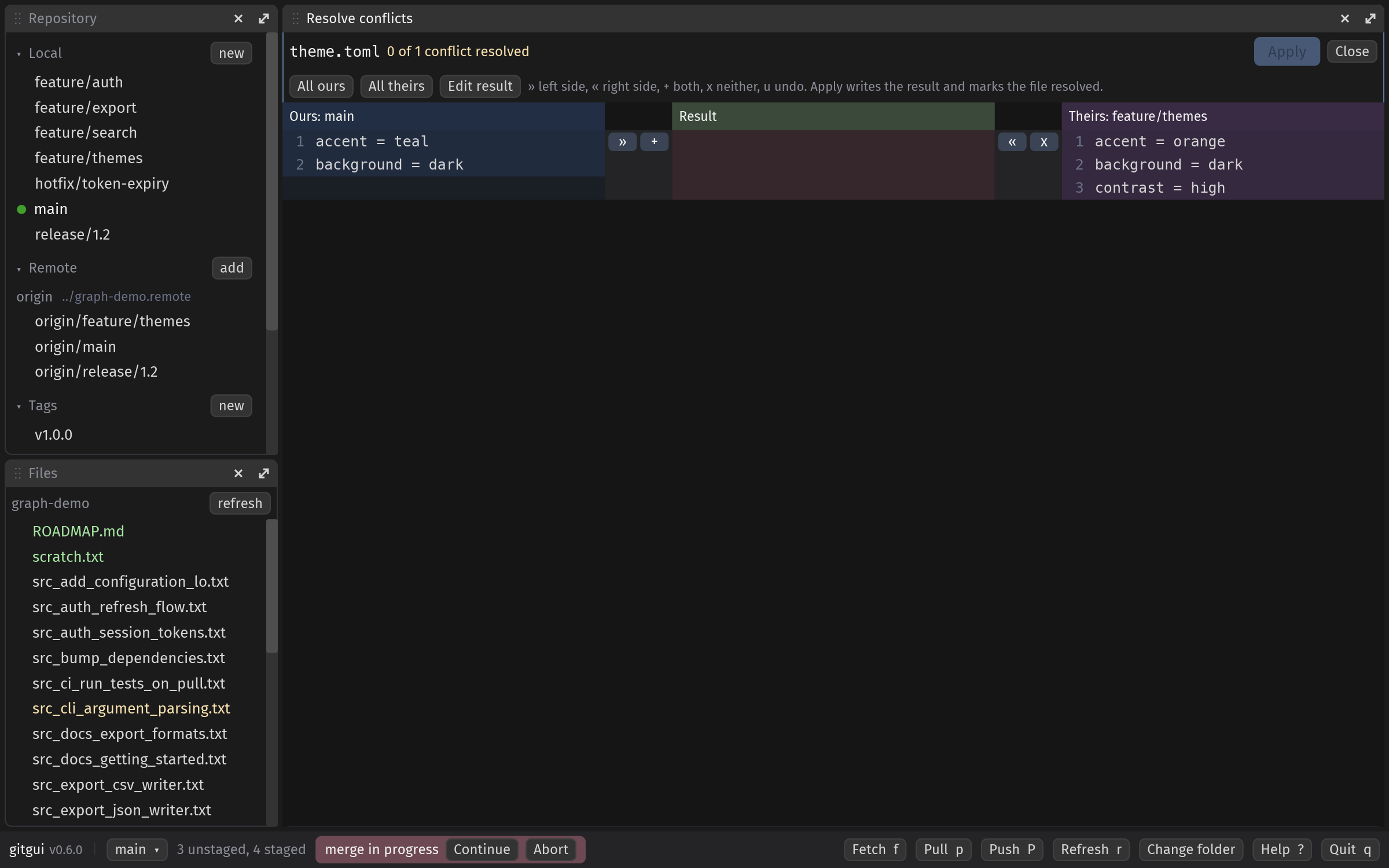
- Three-way conflict resolver: ours, result, theirs side by side with per-conflict take-left, take-right, keep-both, drop buttons, accept-all, edit the result, apply and mark resolved. Conflicted files also get a banner with whole-file ours / theirs.
- History rewriting from the commit menu: reword, squash, fixup, drop, move up / down, edit, autosquash. gitgui runs
git rebasewith itself as the sequence editor, so no editor pops up in your pane. - Branches, remotes, tags, stashes in a collapsible sidebar: checkout, create, rename, delete, merge, rebase onto, fast-forward, upstream, open pull request, delete on remote, fetch one remote, push a tag, apply / pop / drop / branch from stash.
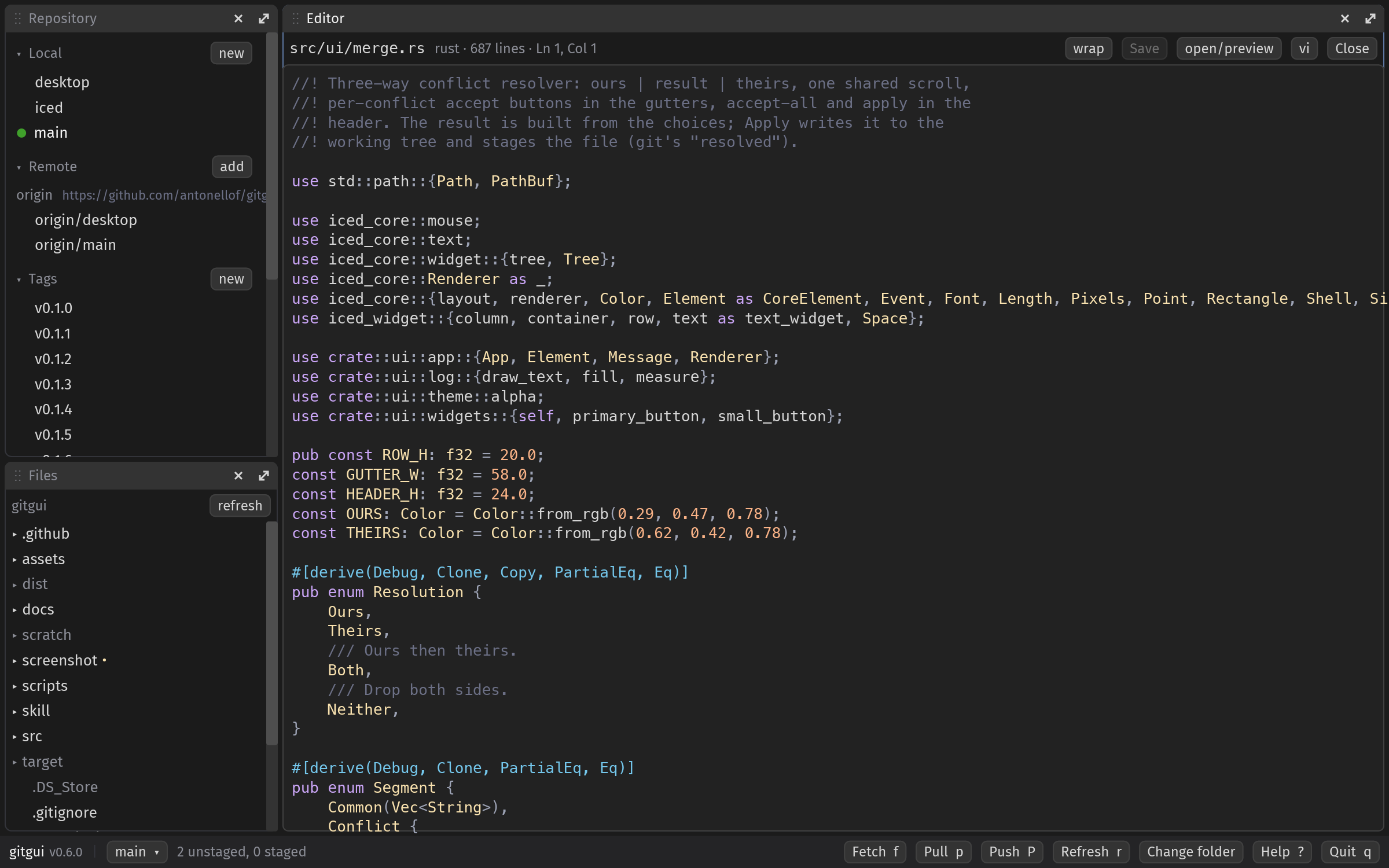
- File tree of the whole working tree, folders listed on demand, changed files colored. Click a file and it opens in the built-in editor.
- Editor on iced’s text editor with syntax colors for the common languages, undo,
Ctrl+S.Shift+Eopens the file in your own editor in a new cmux split (--editor,git config gitgui.editor,$EDITOR; GUI editors likecodeopen detached).Shift+Oopens cmux’s file preview.
- Merge and rebase state in the footer with continue / abort / skip.
- Change folder from the footer or
Ctrl+O: a folder dialog with git repositories marked, so one gitgui pane follows you across projects. Zoom withCtrl+=/Ctrl+-. - SHA-256 repositories (
git init --object-format=sha256) open, diff and commit like any other; libgit2 is built with its SHA-256 support. - Branch switcher, publish to GitHub through
gh, initialize a non-git folder, auto refresh every 2 s when the repo changes. - Agent socket:
gitgui ls,gitgui action '{"cmd":"status"}', so Pi or Cursor query status, select commits, stage paths, fetch, push, or save a PNG screenshot.
Keys are single letters and Ctrl combinations terminals do not steal. cmux keeps Cmd+*. ? lists them all. Quit with q or Ctrl+C, or click Quit in the footer.
And outside cmux: a desktop window
Not every terminal speaks kitty graphics. Terminal.app, iTerm2, the VS Code terminal, tmux. Since v0.6.0 the same binary notices that and opens a native window instead, still the same iced UI and the same tiny-skia renderer, through winit and softbuffer, no GPU. gitgui --window forces it, and scripts/bundle-macos.sh wraps it as gitgui.app with the logo as its icon, so it also launches from Finder. Started outside a repository it shows the logo and a Change folder button.
The terminal split, cmux’s file preview and agent screenshots stay terminal-only; keys, panes, the state file and the agent socket work the same.
Install
You need macOS or Linux. In a kitty-graphics terminal gitgui draws into the pane; anywhere else it opens a desktop window.
Quick start:
curl -fsSL https://raw.githubusercontent.com/antonellof/gitgui/main/scripts/install.sh | bash
That one-liner works on public repos. Private repo? Clone with gh and run the script locally:
gh repo clone antonellof/gitgui
cd gitgui
bash scripts/install.sh
Pin a release:
GITGUI_VERSION=0.6.0 bash scripts/install.sh
The script pulls a release binary when GitHub has one. Otherwise it builds from source with cargo (Rust 1.95+). Success looks like:
installed: ~/.local/bin/gitgui

run in a kitty-graphics terminal (cmux, Ghostty, kitty):
  gitgui                  open repo in current directory
  gitgui /path/to/repo    open a specific repo
  gitgui --split right .  open in a new terminal split

quit with q or Ctrl+C
Check terminal support:
gitgui --probe
cmux + Pi + gitgui
Same workspace as the trio post. One extra split.
Pane A, Pi:
cd ~/Projects/my-app
pi
Pane B, gitgui, from the agent pane:
gitgui --split right .
cmux runs new-split right and send with the gitgui command. Or split by hand and type gitgui in the new pane.
Give your agent the skill file:
mkdir -p ~/.cursor/skills/gitgui
ln -sf ~/path/to/gitgui/skill/SKILL.md ~/.cursor/skills/gitgui/SKILL.md
Drive the GUI from the shell:
gitgui ls
gitgui action '{"cmd":"status"}'
gitgui action '{"cmd":"stage","paths":["src/main.rs"]}'
gitgui action '{"cmd":"fetch"}'
gitgui action '{"cmd":"commit_and_push","message":"fix layout"}'
gitgui action '{"cmd":"screenshot","path":"/tmp/frame.png"}'
Run action from the pane where gitgui lives and it finds the instance via the controlling tty. Writes queue on a background git thread. Poll status until busy hits zero.
A typical session: Pi edits and runs tests on the left. gitgui auto-refreshes on the right. You stage hunks, click Commit or Commit & Push, or use Ctrl+Enter / Ctrl+Shift+Enter. Switch branches from the status bar when Pi opens a feature branch. Or Pi stages through gitgui action and you type the commit message yourself.
Inside the binary
One Rust process. Three threads.
stdin reader blocks on terminal bytes and feeds a parser for kitty keys, SGR mouse, paste, resize.
main loop runs iced without a window: it builds the UI, feeds it the terminal events, applies the messages, and lets tiny-skia draw straight into the framebuffer that goes out as kitty graphics. The commit log, the diff and the conflict resolver are custom widgets that draw only their visible rows.
git worker uses libgit2 for reads and index writes. fetch, pull, and push shell out to git so your credential helper and SSH agent stay untouched. A background poll every 2 s refreshes the snapshot when files change on disk, so Pi edits show up without a manual refresh.
The UI reads an immutable RepoSnapshot. The worker swaps in a new snapshot after each command. Rendering never calls git.
iced 0.14 (iced_core, iced_runtime, iced_widget, iced_renderer on tiny-skia; the iced umbrella crate with winit only for the window mode), git2 with libgit2’s SHA-256 support, libc for termios and shm, serde for the agent API. No Electron. No GPU backend. No tokio. Spec and protocol bytes live in docs/SPEC.md and docs/PROTOCOLS.md.
One refactor, start to finish
Pi touches three files. You want the graph to update, one hunk staged and one left alone, and a commit message you wrote yourself. All inside cmux.
Before gitgui: git diff in the shell for small diffs, Alt-Tab to Fork for a graph, lazygit when you want speed over pixels.
Now: gitgui --split right . once per session. Tab between Pi and gitgui. Edits from Pi land in the unstaged list within a couple of seconds. Stage one hunk, leave another, or select three lines and stage just those. Type a message, hit Commit & Push, or fetch first from the footer. Need a feature branch? Click the branch name, pick from the list, stash if you have WIP. Merge came back with conflicts? Click Resolve, take a side per conflict, Apply, Continue. Want to fix a typo in a file Pi touched? Click it in the tree, edit, Ctrl+S.
cmux still rings when Pi waits on you. Mouse clicks hit the right widgets. SSH sessions use the direct transport and the same UI.
What it still skips
cmux and Ghostty are the main targets. kitty works. tmux and Zellij do not pass kitty graphics through; there, and in any terminal without them, gitgui opens its desktop window instead of drawing into the pane.
Ghostty on macOS has no stable split-from-child API. gitgui --split prints a keybind hint and runs in the current pane when needed.
The editor has no line-number gutter yet, and the resolver’s result column is not editable in place: press Edit result to hand-edit the merged file.
If you already run cmux and Pi, gitgui is the git pane I wished existed. Install it, split right, keep the graph beside the harness.
gitgui: github.com/antonellof/gitgui. cmux: cmux.dev. Pi: pi.dev. Related: The Local Agent Trio: cmux + Pi + Unsloth Studio.